
Streamlined Video Editing for the Digital Age: VIDEO STUDIO
 Admin
Admin
Updated :
In the modern digital era, content creation is no longer limited to professional video editors or large studios. The demand for video content is rapidly increasing across blogging, social media marketing, e-commerce, online education, and news publishing. Keeping this demand in mind, VIDEO-STUDIO has been developed as a modern and powerful video editing tool.
This tool allows users to edit videos directly within their browsers. Without needing to install any heavy standalone software, users can perform essential editing tasks such as cutting videos, adding text, managing audio, and incorporating various elements.
This article discusses the core features, benefits, security, and potential use cases of VIDEO-STUDIO.
1. Why VIDEO-STUDIO?
Video editing typically requires installing separate software. Following installation, users often have to go through multiple steps including importing videos, editing, rendering, and exporting. For beginners, this process can frequently feel complex and overwhelming.
VIDEO-STUDIO is designed precisely to simplify this workflow. Because it is browser-based, users can navigate directly to a specific editing page and start working immediately. Consequently, the need to deal with separate software is minimized, enabling rapid video editing.
2. Key Features
-
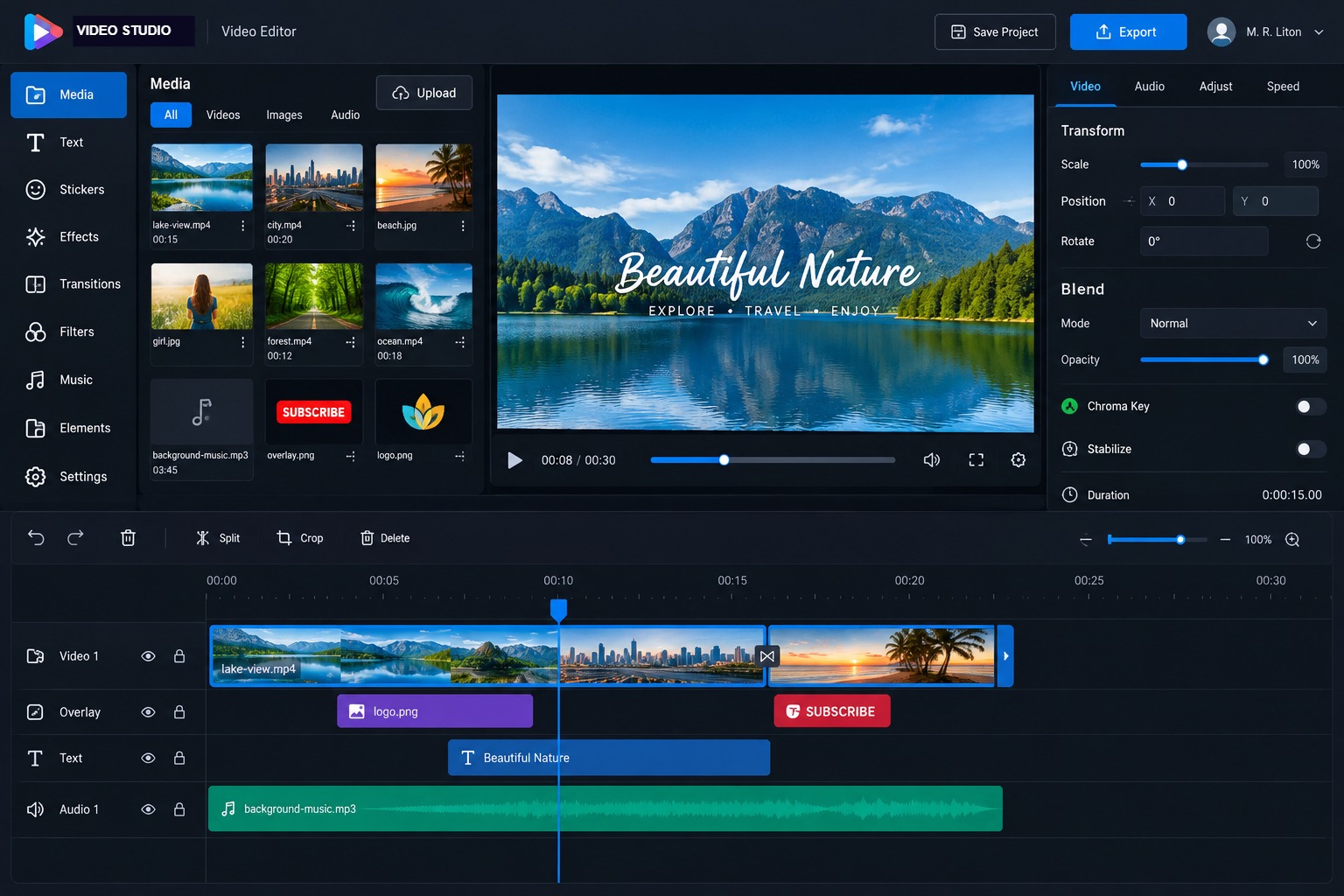
Browser-Based Video Editing: One of the standout features of VIDEO-STUDIO is its ability to edit videos directly inside the browser. Video cutting, clip management, and various editing tasks can be performed right from the editing interface.
-
Mobile and Desktop Friendly: Many creators nowadays produce content using smartphones or tablets. Therefore, the VIDEO-STUDIO interface is built to accommodate both touchscreen and desktop environments, allowing editing tasks to be performed seamlessly across different devices based on need.
-
Resizable Timeline: An essential part of video editing is the timeline. VIDEO-STUDIO features an easily controllable and resizable timeline, making it effortless to trim, split, arrange video clips, and work with precise segments.
-
Text & Custom Fonts: To add titles, captions, subtitles, or essential information to videos, the platform provides a text overlay feature. Users can modify fonts, text content, and styles according to their specific requirements.
-
Audio & Background Music: Users can integrate background music or necessary audio tracks into their videos. Additionally, various audio management features provide the opportunity to optimize video sound quality.
-
Auto-Draft: If a browser unexpectedly closes or work is interrupted during editing, progress can often be lost. To mitigate this risk, VIDEO-STUDIO includes an auto-draft feature, which automatically saves work progress.
3. Privacy and Data Security
When using online editing tools, a crucial question users often have is: Where are my videos or personal files being processed?
The architecture of VIDEO-STUDIO places a strong emphasis on local device-based processing. Because video editing tasks are handled directly within the browser, there is no need to unnecessarily transmit user files to third-party servers.
This not only ensures the privacy of personal videos, images, and other content but also reduces excessive server-side processing loads.
4. Simple Setup and Usability
Along with a powerful editing tool, ease of use is equally important. The setup process for VIDEO-STUDIO is designed to be user-friendly.
Once activated on a system, a specific editing page is automatically generated. Users can enter that page to launch VIDEO-STUDIO directly, eliminating the need for complex configurations or manual page creation.
Its interface is also clean and modern, allowing even beginners to gradually familiarize themselves with the various tools and easily start editing videos.
5. Who Can Use It?
-
Bloggers and News Publishers: Useful for quickly editing short videos, news clips, social media videos, or essential website content.
-
E-commerce Business Owners: Can be utilized to create and edit promotional product videos, product showcases, or short review clips.
-
Teachers and Instructors: Highly effective for creating and editing online classes, tutorials, or training videos.
-
Social Media Content Creators: A time-saving solution for individuals looking to rapidly create, edit, and publish videos.
6. Advantages and Limitations
Advantages
-
In-browser video editing capabilities
-
Eliminates the need for heavy standalone software
-
Usable on both desktop and mobile devices
-
Resizable timeline functionality
-
Text and custom font integration
-
Audio and background music management
-
Auto-draft protection feature
-
Automatic editing page generation
-
Local device-based processing for enhanced privacy
Limitations
-
For very large or long 4K videos, performance depends on the user device’s processor, RAM, and browser capabilities. On lower-spec devices, processing speed may decrease when handling large videos.
-
Furthermore, highly specialized professional software remains more suitable for professional filmmaking, complex color grading, or high-end VFX tasks.
Conclusion
As the demand for video content grows, the need for easy, fast, and user-friendly editing solutions increases correspondingly. VIDEO-STUDIO is a modern browser-based video editing tool created with precisely that need in mind.
Thanks to its intuitive interface, timeline editing, text overlays, audio management, auto-drafting, and cross-device compatibility, it serves a diverse range of users effectively.
Particularly for those who want quick video editing capabilities without heavy software, VIDEO-STUDIO stands out as an efficient solution. Amidst the rising demand for digital content creation, such browser-based editing systems are poised to become even more vital in the future.